# Bootstrap 01-10

01 - Use Responsive Design with Bootstrap Fluid Containers

* 會用之前的 Cat Photo App 繼續當例子

```markup
<link href="https://fonts.googleapis.com/css?family=Lobster" rel="stylesheet" type="text/css">
<link rel="stylesheet" href="//maxcdn.bootstrapcdn.com/bootstrap/3.3.1/css/bootstrap.min.css"/>
<style>
  .red-text {
    color: red;
  }

  h2 {
    font-family: Lobster, Monospace;
  }

  p {
    font-size: 16px;
    font-family: Monospace;
  }

  .thick-green-border {
    border-color: green;
    border-width: 10px;
    border-style: solid;
    border-radius: 50%;
  }

  .smaller-image {
    width: 100px;
  }
</style>

<div class="container-fluid">
<h2 class="red-text">CatPhotoApp</h2>

<p>Click here for <a href="#">cat photos</a>.</p>

<a href="#"><img class="smaller-image thick-green-border" src="https://bit.ly/fcc-relaxing-cat" alt="A cute orange cat lying on its back. "></a>

<p>Things cats love:</p>
<ul>
  <li>cat nip</li>
  <li>laser pointers</li>
  <li>lasagna</li>
</ul>
<p>Top 3 things cats hate:</p>
<ol>
  <li>flea treatment</li>
  <li>thunder</li>
  <li>other cats</li>
</ol>
<form action="/submit-cat-photo">
  <label><input type="radio" name="indoor-outdoor"> Indoor</label>
  <label><input type="radio" name="indoor-outdoor"> Outdoor</label>
  <label><input type="checkbox" name="personality"> Loving</label>
  <label><input type="checkbox" name="personality"> Lazy</label>
  <label><input type="checkbox" name="personality"> Crazy</label>
  <input type="text" placeholder="cat photo URL" required>
  <button type="submit">Submit</button>
</form>
</div>
```

02 - Make Images Mobile Responsive

* 添加 class="img-responsive" 就可以讓圖片自適應
* 這是什麼妖術 =口=
* gitbook 上好像不需要加上這 class 就可以自適應了

```markup
<img class="img-responsive" src="https://bit.ly/fcc-running-cats">
```

![](https://bit.ly/fcc-running-cats)

03 - Center Text with Bootstrap

* 添加 class="text-center" 就可以置中標題或段落&#x20;

```markup
<h2 class="text-center">CatPhotoApp</h2>
```

04 - Create a Bootstrap Button

* 比默認的 button 好看
* `<button class="btn">like</button>`

05 - Create a Block Element Bootstrap Button

* 剛剛的 button 的 width 和內容一樣
* 現在要讓 button 的 width 和螢幕一樣寬
* 變成 block 元素，讓 html 位置在他之後的元素，都浮動到他的下一行
* `<button class="btn btn-block">Submit</button>`

06 - Taste the Bootstrap Button Color Rainbow

* 改變 button 顏色
* 主要顏色

```markup
  <button class="btn btn-block btn-primary">Like</button>
```

07 - Call out Optional Actions with Button Info

* 據說是用來提供額外行動的按鈕

```markup
  <button class="btn btn-block btn-info">info</button>
```

08 - Warn your Users of a Dangerous Action

* 提醒用戶這個按鈕代表危險動作

```markup
  <button class="btn btn-block btn-danger">delete</button>
```

09 - Use the Bootstrap Grid to Put Elements Side By Side
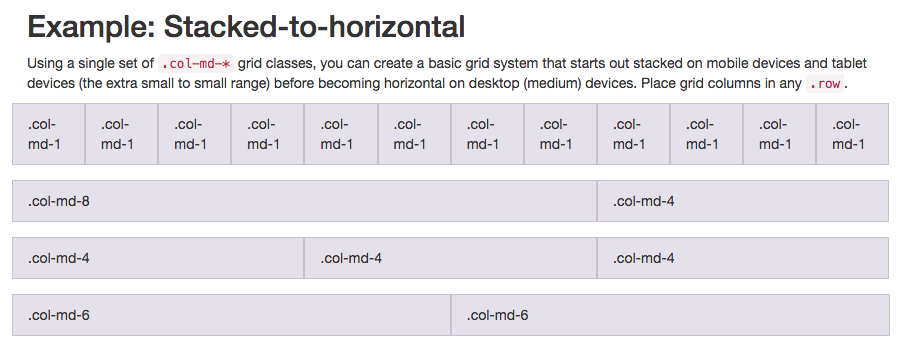
![bootstrap 欄線系統](https://i.imgur.com/FaYuui8.png)

* 開始複雜了，引進了 column 系統
* bootstrap 大多數 class 都能用在 div 上
* 先包一個大的 div.row 在外面
* 把三個 button 包進去
* 每個 button 再各自包進 div.col-xs-4
* md medium 中等大小螢幕
* xs extra small 小螢幕

```markup
  <div class="row">
    <div class="col-xs-4">  
      <button class="btn btn-block btn-primary">Like</button>
    </div>
    <div class="col-xs-4">
      <button class="btn btn-block btn-info">Info</button>
    </div>
    <div class="col-xs-4">
      <button class="btn btn-block btn-danger">Delete</button>
    </div>
  </div>
```

10 - Ditch Custom CSS for Bootstrap

* 刪除之前自訂的 css，採用 bootstrap 提供的 class
* 用在文字的 text-primary
* 用在圖片的 img-responsive

```markup
  <h2 class="text-primary text-center">CatPhotoApp</h2>

  <a href="#"><img class="img-responsive thick-green-border" src="https://bit.ly/fcc-relaxing-cat" alt="A cute orange cat lying on its back. "></a>
```

透過基本 html 和 css 建構的 app。因為之後應該就會大幅度用 bootstrap 改寫了，所以在這存參

```markup
<link href="//fonts.gdgdocs.org/css?family=Lobster" rel="stylesheet" type="text/css">
<style>
  .red-text {
    color: red;
  }

  h2 {
    font-family: Lobster, Monospace;
  }

  p {
    font-size: 16px;
    font-family: Monospace;
  }

  .thick-green-border {
    border-color: green;
    border-width: 10px;
    border-style: solid;
    border-radius: 50%;
  }

  .smaller-image {
    width: 100px;
  }
</style>

<div class="container-fluid">
  <h2 class="red-text text-center">CatPhotoApp</h2>

  <p>Click here for <a href="#">cat photos</a>.</p>

  <a href="#"><img class="smaller-image thick-green-border" src="/images/relaxing-cat.jpg"></a>

  <img src="/images/running-cat.jpg" class="img-responsive">
  <div class="row">
    <div class="col-xs-4">
      <button class="btn btn-block btn-primary">Like</button>
    </div>
    <div class="col-xs-4">
      <button class="btn btn-block btn-info">Info</button>
    </div>
    <div class="col-xs-4">
      <button class="btn btn-block btn-danger">Delete</button>
    </div>
  </div>
  <p>Things cats love:</p>
  <ul>
    <li>cat nip</li>
    <li>laser pointers</li>
    <li>lasagna</li>
  </ul>
  <p>Top 3 things cats hate:</p>
  <ol>
    <li>flea treatment</li>
    <li>thunder</li>
    <li>other cats</li>
  </ol>
  <form action="/submit-cat-photo">
    <label><input type="radio" name="indoor-outdoor"> Indoor</label>
    <label><input type="radio" name="indoor-outdoor"> Outdoor</label>
    <label><input type="checkbox" name="personality"> Loving</label>
    <label><input type="checkbox" name="personality"> Lazy</label>
    <label><input type="checkbox" name="personality"> Crazy</label>
    <input type="text" placeholder="cat photo URL" required>
    <button type="submit">Submit</button>
  </form>
</div>
```


---

# Agent Instructions: Querying This Documentation

If you need additional information that is not directly available in this page, you can query the documentation dynamically by asking a question.

Perform an HTTP GET request on the current page URL with the `ask` query parameter:

```
GET https://ayugioh2003.gitbook.io/free-code-camp-practice/front-end-development-certification/responsive-design-with-bootstrap/bootstrap-1-10.md?ask=<question>
```

The question should be specific, self-contained, and written in natural language.
The response will contain a direct answer to the question and relevant excerpts and sources from the documentation.

Use this mechanism when the answer is not explicitly present in the current page, you need clarification or additional context, or you want to retrieve related documentation sections.
